
A notes app for people with years of notes.
Notebooks, stacks and nested tags, with search that reads inside your scans and PDFs. Import the notes you already have and pick up where you left off.
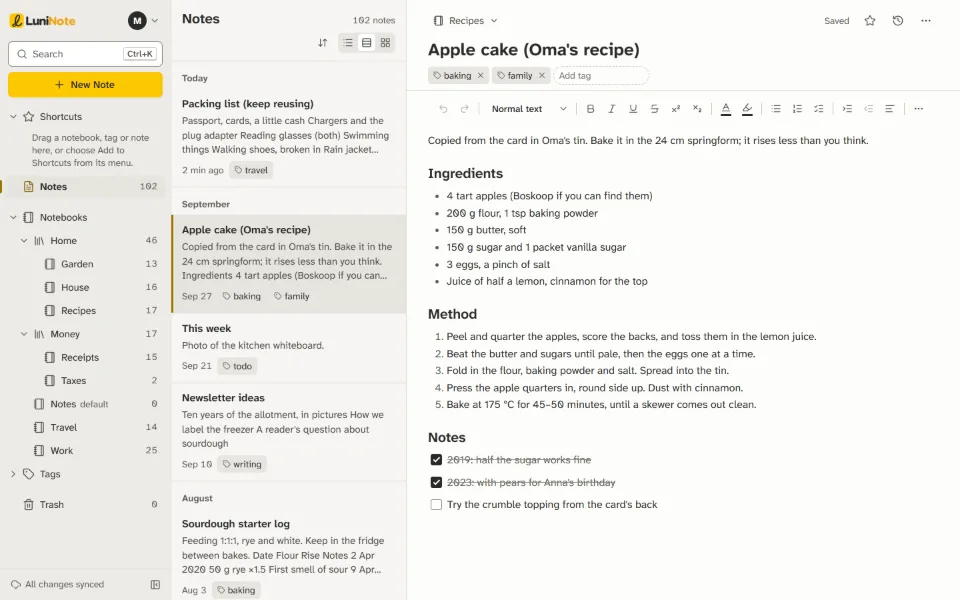
Organized the way you already are.
Notebooks and stacks
Your notebooks, grouped in stacks, with Shortcuts and Trash where you'd look for them.
Tags inside tags
Nested tags and saved searches keep the order you built over the years.
The searches you know
Narrow it down with
tag:,notebook:,intitle:orcreated:.Keys under your fingers
Three panes, list, snippet or card view, and the keyboard shortcuts you're used to.
Bring everything, and get a receipt.
The LuniNote browser extension moves your whole account in one go: notebooks with their stacks, tags with their nesting, saved searches, attachments and dates. It only reads from Evernote and never changes anything there.
Prefer files? Import the .enex files you exported, one notebook each.
Either way, a report accounts for every note. Every attachment is checked against its fingerprint, and anything that couldn't come across is listed with the reason.

Find it, even when it's a scan.
LuniNote reads the words in your scanned letters, photographed receipts, PDFs and Office files, so a search finds them too. The result tells you which file the word is in, and on which page.
The reading happens on our own server. No outside service ever sees your files.

Every version kept. Nothing overwritten.
Keep writing when the connection drops; LuniNote keeps a copy in your browser and catches up when you're back.
Every change to a note is saved as a version you can open and restore. If the same note changed in two places, you get both copies, never a silent overwrite. And nothing leaves the Trash unless you empty it.

Leave whenever you like.
Export your whole account at any time, from Settings, as one file: Evernote-format files, web pages, Markdown, or a complete archive with every tag, shortcut and saved search. There's no form to fill in and no one to ask.

Free during the open beta.
LuniNote is in open beta: anyone can sign up. Create an account, bring your notes across, and look around before you decide anything.
- ✓ No card needed
- ✓ Export everything, any time
- ✓ Keep your Evernote plan until you're sure
Questions before you move
Do I have to cancel my Evernote plan first?
No. Keep it until you've looked through your notes in LuniNote and the report says everything arrived. Moving only reads from your Evernote account, so both stay as they were.
Does the move change anything in my Evernote account?
No. The LuniNote extension only reads. It never edits, moves or deletes anything there, and your Evernote sign-in stays in your browser; it isn't sent to us.
What doesn't come across?
Shortcuts, which you pin again in one step at the end, and the earlier versions of each note, which stay in Evernote. If you import .enex files instead of using the extension, tags arrive without their nesting and saved searches stay behind, because the files don't hold them.
Which browsers does it work in?
Chrome, Edge and Brave on a computer for now. Firefox, Safari and phone browsers come later; a layout for small screens is built and waiting on them. There are no phone or desktop apps yet.
What will it cost?
Nothing during the open beta. There will always be a free plan. If paid plans come, we'll tell you well in advance, and nothing is charged without your clear agreement.
Is there an AI assistant?
No. The text in your scans is read by a text-recognition model on our own server, and that's all. Your notes are never sent to an AI service, and never used to train one.